Input
- Description with nominal dimensions in mm, form or supported STEP file
- Optional material; thickness required for STEP
Fidument Tools · Beta version
Describe a flat plate, fill in the form or import a supported STEP. Edit its profile, holes and thickness, inspect the preview and prepare DXF or STEP.
Need a simple plate for laser cutting without drawing it from scratch in a full CAD system?
Use mm and specify hole centres as X/Y. Review reported missing data. Import only a constant-thickness flat STEP part.
Edit permitted dimensions, profile, holes and thickness. Supported lines and arcs are retained after import. The solid preview is a working view.
Choose DXF 2D or an additional STEP requiring thickness. Inspect files before manufacturing. A project can explicitly retain the exact result.
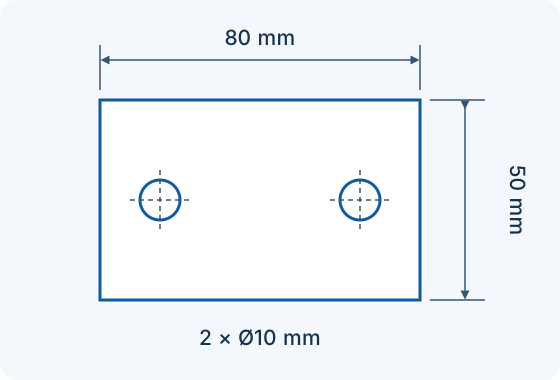
Form example: an 80 × 50 mm rectangle, 3 mm thick, with two Ø10 mm holes. Hole centres: X=15, Y=25 mm and X=65, Y=25 mm, measured from the lower-left corner. Choose material and cutting parameters for your application.
No. Import supports one constant-thickness flat part with supported lines, arcs and circles. Bends, assemblies and unsupported surfaces are rejected.
No. A description proposes data for confirmation and the result contains geometry. A technologist must check the file, material and cutting parameters.
Open the Sheet Metal Creator, choose an outline and enter the dimensions and holes. Check the preview, units and hole positions, then select 2D DXF. Check the geometry before preparing the cutting process.
2D DXF describes the flat outline and holes. STEP represents a supported flat solid with confirmed thickness. Neither file is itself a laser machine program.
Current access terms, available offers and billing are shown in the tool. A part description and material choice do not order a cutting service.
Reconstruct simple flat parts from sketches or PDFs using dimensions. Review the outline, holes and questions before DXF export.
Extract the visible contour of a flat object, enter a reference dimension and prepare a PDF with approximate measurements and data for further reconstruction.
Open a 2D DXF drawing, choose layers, units and scale, then download vector PDF or SVG. Beta version; check access and export conditions in your account before execution.
Check access and export conditions in the app. A product description does not grant access.