Fidument Tools · Beta version

Does a calendar reject an import or show the wrong event dates?

Check ICS event fields, date consistency and timezone declarations. Download a JSON report.

Does a calendar reject an import or show the wrong event dates?

How to use this tool

  1. Select the ICS file

    Choose a UTF-8 file containing a VCALENDAR and its VEVENT entries.

  2. Run the check

    Choose Run. The tool checks selected fields, date consistency and the use of declared timezones.

  3. Read the report

    Download ical-report.json. Review event and error counts, warnings and the affected event numbers.

Dates for all-day events

Use the same value type for start and end. The end date is the day after the last day of the event.

Who is it for?

  • People troubleshooting calendar imports and exports

Input

  • UTF-8 ICS calendar file

Output

  • ical-report.json

Capabilities

  • Choose a UTF-8 file containing a VCALENDAR and its VEVENT entries.
  • Choose Run. The tool checks selected fields, date consistency and the use of declared timezones.
  • Download ical-report.json. Review event and error counts, warnings and the affected event numbers.

Limitations

  • One file up to 4 MiB and up to 5000 events. The report shows up to 100 diagnostic entries.
  • Covers VEVENT fields and date consistency. Recurrence expansion is outside this check.
  • Files are processed on your device in the browser.

Example use

An all-day event starting on 29 February 2024 and ending on 1 March 2024 passes the check.
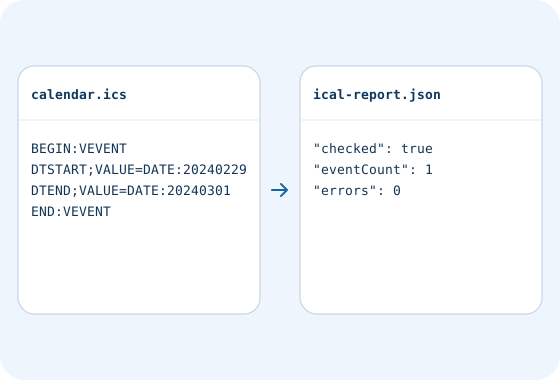
Example file workflow · ICS calendar file checker. An all-day event starting on 29 February 2024 and ending on 1 March 2024 passes the check.
Example data to enter in the form

Questions and answers

Does the report repair my calendar file?

It points out issues for you to review in the source calendar application. Download the report as JSON.

Related tools

JSON formatter

Format JSON with indentation or compact output. Check the syntax and download a file.

ICS calendar file checker

Check access and export conditions in the app. A product description does not grant access.