Fidument Tools · Beta version

Are letters in a CSV file or log displayed as garbled characters?

Convert Windows-1250, ISO-8859-2 or UTF-16 to UTF-8. Select the source encoding and optional BOM.

Are letters in a CSV file or log displayed as garbled characters?

How to use this tool

  1. Select a text file

    Choose the source text file, such as a CSV exported in Windows-1250.

  2. Choose the source encoding

    Select UTF-8, Windows-1250, ISO-8859-2, UTF-16 LE or UTF-16 BE. Choose whether to include a BOM in the output.

  3. Download the UTF-8 file

    Choose Run. Review the characters in the preview and download the result.

Windows-1250 and ISO-8859-2

Check the encoding in the system that exported the file. The two encodings use different byte values for some Central European letters.

Who is it for?

  • People importing tables, exports or text logs

Input

  • A UTF-8, Windows-1250, ISO-8859-2, UTF-16 LE or UTF-16 BE file

Output

  • UTF-8 file with optional BOM

Capabilities

  • Choose the source text file, such as a CSV exported in Windows-1250.
  • Select UTF-8, Windows-1250, ISO-8859-2, UTF-16 LE or UTF-16 BE. Choose whether to include a BOM in the output.
  • Choose Run. Review the characters in the preview and download the result.

Limitations

  • One file up to 4 MiB. CSV, TSV, LOG and TXT extensions are preserved. Other extensions produce a TXT file.
  • Source encoding is selected manually. A conflicting BOM, invalid byte sequence or NUL character blocks the export.
  • Files are processed on your device in the browser.

Example use

The Windows-1250 CSV row Łódź;001 converts to UTF-8 with its leading zeros and line ending intact.
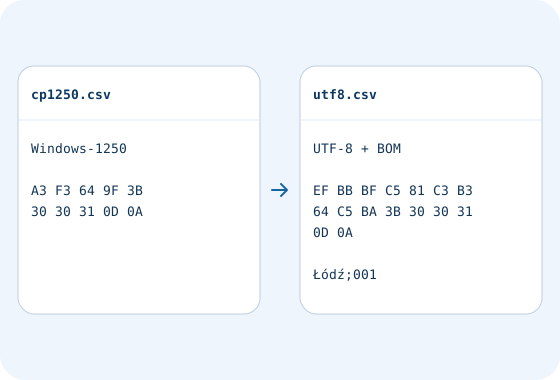
Example file workflow · Text encoding converter to UTF-8. The Windows-1250 CSV row Łódź;001 converts to UTF-8 with its leading zeros and line ending intact.
Example data to enter in the form

Questions and answers

When should I include a BOM?

Include it if the importer requires it. Leave No BOM selected for integrations that expect plain UTF-8.

Related tools

CSV to JSON

Convert a CSV file into an array of JSON objects in your browser. Keep leading zeros and empty fields.

CSV ↔ XML

Convert CSV to XML or XML to CSV in your browser. Keep text identifiers and preview the output.

Text encoding converter to UTF-8

Check access and export conditions in the app. A product description does not grant access.