Input
- JSON array or NDJSON/JSON Lines in UTF-8
Fidument Tools · Beta version
Convert JSON to NDJSON or back to an array. Keep numeric spellings and large identifiers intact.
Need to turn a JSON array into one record per line?
Use JSON → NDJSON for an array, or NDJSON → JSON for one record per line.
For JSON → NDJSON, select a top-level array. For NDJSON → JSON, each line should contain one complete JSON value.
Download records.ndjson or records.json. For an invalid NDJSON record, use the reported line number to locate and correct it.
NDJSON input accepts LF and CRLF. Records are separated by the line endings in the file.
The identifier 9007199254740993 and number 1.2300e-50 retain their digits and exponent spelling after conversion.
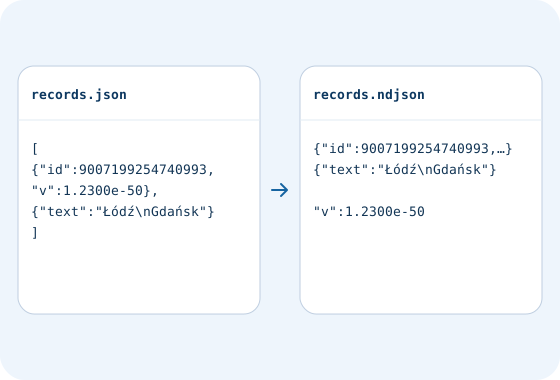
Yes. Each array entry becomes one NDJSON line, including entries containing objects or nested arrays.
Convert a CSV file into an array of JSON objects in your browser. Keep leading zeros and empty fields.
Format JSON with indentation or compact output. Check the syntax and download a file.
Validate JSON using the supported JSON Schema 2020-12 vocabulary. Read locations and violated rules in the report.
Check access and export conditions in the app. A product description does not grant access.