Fidument Tools · Beta version

Need to preview the result of JSON Patch operations before using them?

Apply RFC 6902 operations to a JSON document. Download the result once the full sequence succeeds.

Need to preview the result of JSON Patch operations before using them?

How to use this tool

  1. Select the JSON document

    Choose the UTF-8 input file to which the operations will be applied.

  2. Select the patch operations

    Add an array using add, remove, replace, move, copy or test. Specify paths using JSON Pointer.

  3. Check a result or error

    Choose Run and download patched.json. If an operation fails, correct the reported step and run the full sequence again.

Special characters in paths

In JSON Pointer, write / within a key as ~1 and ~ as ~0.

Who is it for?

  • Developers and testers preparing changes to JSON data

Input

  • JSON document and JSON Patch operation array

Output

  • patched.json

Capabilities

  • Choose the UTF-8 input file to which the operations will be applied.
  • Add an array using add, remove, replace, move, copy or test. Specify paths using JSON Pointer.
  • Choose Run and download patched.json. If an operation fails, correct the reported step and run the full sequence again.

Limitations

  • Up to 256 KiB per input, 500 operations, 64 levels of nesting and 1 MiB output.
  • Ambiguous keys and numbers outside the supported precision range are rejected. Protected prototype properties are disabled.
  • Files are processed on your device in the browser.

Example use

The replace operation at /context/a~1b changes the value of key a/b, while add at /items/- appends an array element.
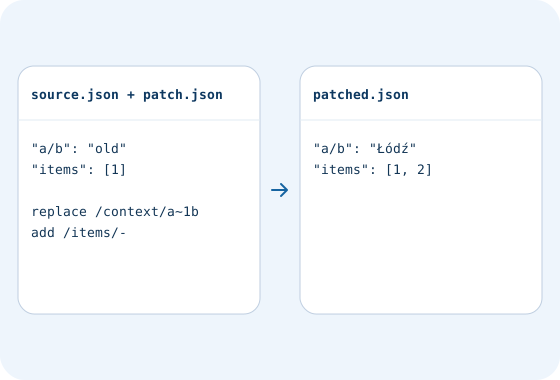
Example file workflow · JSON Patch tool (RFC 6902). The replace operation at /context/a~1b changes the value of key a/b, while add at /items/- appends an array element.
Example data to enter in the form

Questions and answers

Can I download a partial result after an error?

Export becomes available once every operation in the array has succeeded.

Related tools

JSON formatter

Format JSON with indentation or compact output. Check the syntax and download a file.

JSON Patch tool (RFC 6902)

Check access and export conditions in the app. A product description does not grant access.